
Release date: August 13th 2024
Welcome to my Omnissa Horizon series. In this session I will describe how I upgraded my VMware Horizon GPO Templates to v.2406. According to the release notes: Horizon 8 2406 Release Notes, these are some of the changes to the Horizon GPO Templates:
- 2417249: Users cannot use a serial printer with the serial port redirection feature when Horizon Agent is installed in an RDS host if the agent group policy setting COM Port Isolation Mode is set to Full Isolation (the default setting). This problem affects both Windows and Linux clients. This problem does not occur for virtual desktops.
- Workaround: Edit the COM Port Isolation Mode group policy setting, change the mode to Isolation Disabled , and restart Horizon Agent. For more information, see Configuring Serial Port Redirection Group Policy Settings.
- 2481953: When you update the OS from Windows 1809 to 1903, you might see a black screen on Horizon Agent.
- Workaround: Apply the procedure in this KB article on the OS image. If Horizon Agent is installed on an RDS host, and the Printer Name for RDSH Agents group policy setting for the VMware Integrated Printing feature is configured to use the client machine name as a suffix, the client machine name supports only English-language characters. If the client machine name contains characters in a non-English language, the VMware Integrated Printing feature does not work in published desktops and published applications.
Upgrading the GPO templates is done as step 12 in the supported update sequence.

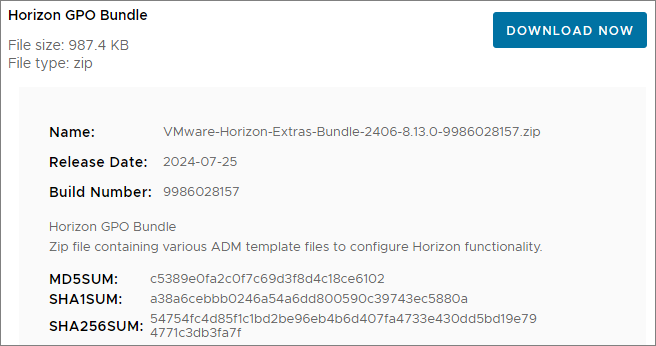
I start out by downloading the Horizon GPO Bundle from Omnissa Customer Connect
Previously I’ve done this manually, but this time I will be doing the admx-upgrade from my management server, using the PowerShell script below. The workflow of the script is as follows:

Prerequisites:
- Permissions to write to SYSVOL PolicyDefinitions folder
- Run script in Administrative Powershell session
Hz-copyAdmx.ps1
# Horizon Admx Upgrade script

$installDir = "C:Install"
New-Item -Path $installDir -type directory -Force

$HzBundle = "<network-path>VMware-Horizon-Extras-Bundle*.zip"
Expand-Archive -Path $HzBundle -DestinationPath $installDir

$admxDestination = '<network-path>PolicyDefinitions'

Copy-Item -Path $installDir*.admx -Destination $admxDestination -Recurse -Force
Copy-Item -Path $installDiren-US*.adml -Destination $admxDestinationen-US -Recurse -Force

Remove-Item –path $installDir –Recurse -Force
This concludes my session about upgrading the Horizon GPO Templates to v. 2406. According to the supported upgrade path from VMware, this is the final step in upgrading Horizon. With this done, I can log in and test that everything works as expected.
Omnissa Documentation:
- Horizon 8 2406 Release Notes
- Horizon 8 Upgrade Overview
- Product Interoperability Matrix
- Horizon 8 Docs
Horizon planning, deployment etc.
Disclaimer: Every tips/tricks/posting I have published here, is tried and tested in different it-solutions. It is not guaranteed to work everywhere, but is meant as a tip for other users out there. Remember, Google is your friend and don’t be afraid to steal with pride! Feel free to comment below as needed.
 bjosoren's IT-Tech blog