
Release date: May 25th 2025
Welcome to my Omnissa Horizon series. In this session I will describe how I upgraded the Horizon Windows Agent in my template to v. 2503. According to the Horizon 8 2503 Release Notes, these are the changes to the Horizon Agent:
- Horizon Agent for Windows
- A new TCP bandwidth estimator now further reduces the bandwidth consumed by the Blast protocol. Available for the Windows Agent and Client starting with version 2412, this feature is now available in 2503 for these clients: Horizon Client for Linux, Horizon Client for Mac, Horizon Client for Android and Horizon Client for iOS.
According to Omnissa’s official documentation, this agent-upgrade should be done as step 11 in the supported update sequence.

I start out by downloading the installation media from Omnissa Customer Connect

As I’ve gone over to using MDT to create Horizon templates, described here: Automating Template Creation & Maintenance, I will update the Horizon Agent in the Deployment Share, and run through the task sequence to create a new template. Before I begin, I open the task sequence and can see that it has found the 2312.1 Agent in the Deployment Share.

I close the Deployment Workbench MMC before I continue. To update the Horizon Agent in the Deployment Share I will first delete the existing agent and msi-folder from the Deployment Share.

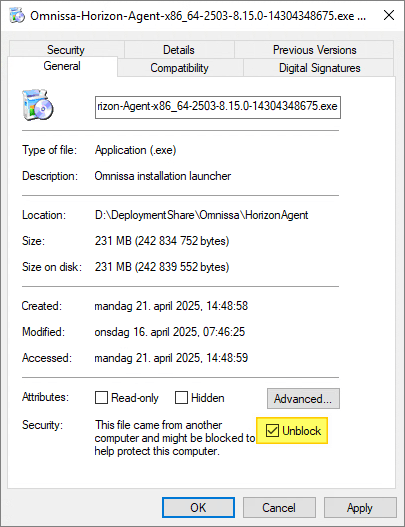
Next, I copy the new VMware Horizon Agent executable to the “HorizonAgent” folder in the Deployment Share. It is important to make sure that the executable isn’t blocked by Windows Security, therefore I right-click the exe-file, select Properties and tick the Unblock box, if it exists. This also applies to the other executable files under the “D:\DeploymentShare\Omnissa” folder.

When I now open the Deployment Workbench MMC, the new Horizon Agent will be identified and the msi-files will be automatically extracted.


Once done, I run through the task sequence and push the new template to my desktop pool.
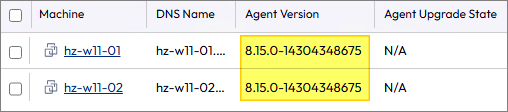
Having finished the Windows Agent upgrade, I can now proceed with upgrading the agent in my Linux template, covered here: Horizon – Upgrade Linux Agent to v. 2503
Horizon 8 Documentation:
Omnissa Documentation:
- Rebranding Changes in Omnissa Horizon Products (6000681)
- Horizon 8 Upgrade Overview
- Product Interoperability Matrix
- Omnissa Product Documentation
Horizon planning, deployment etc.
Disclaimer: Every tips/tricks/posting I have published here, is tried and tested in different it-solutions. It is not guaranteed to work everywhere, but is meant as a tip for other users out there. Remember, Google is your friend and don’t be afraid to steal with pride! Feel free to comment below as needed.
 bjosoren's IT-Tech blog