
Release date: January 9th 2024
Welcome to my VMware Horizon series. As I use MDT to create and maintain my VMware Horizon Golden Templates, I was intrigued when I got the following error during the VMware OSOT “Generalize“-step in my task sequence.

The Generalize step runs after Windows Update in the task sequence, so I suppose this error is due to an update that was installed from WSUS. When I check the setuperr.log, I clearly see that this is due to an appx-package, Microsoft.MicrosoftEdge_44.19041.1266.0_neutral__8wekyb3d8bbwe, causing this error.
SYSPRP Package Microsoft.MicrosoftEdge_44.19041.1266.0_neutral__8wekyb3d8bbwe was installed for a user, but not provisioned for all users. This package will not function properly in the sysprep image.To work around this, I created a little PowerShell script, below, that I set to run after Windows update but before the OSOT Generalize step.
appx-remove.ps1
$aProvPackages=@(Get-AppxProvisionedPackage -Online).PackageName

Get-AppxPackage -AllUsers | ?{ -not ($aProvPackages -contains $_.PackageFullName ) } | %{write-host $_;Remove-AppxPackage -AllUsers -Package $_}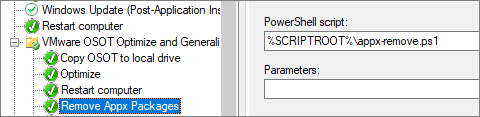

After adding this to my task sequence, the task ran as supposed, without any further errors.
VMware Horizon planning, deployment etc.
Disclaimer: Every tips/tricks/posting I have published here, is tried and tested in different it-solutions. It is not guaranteed to work everywhere, but is meant as a tip for other users out there. Remember, Google is your friend and don’t be afraid to steal with pride! Feel free to comment below as needed.
 bjosoren's IT-Tech blog