
Release date: August 13th 2024
Welcome to my Omnissa Unified Access Gateway series. The new version of Unified Access Gateway, 2406, was GA August 1st 2024. In this section I will describe how I upgraded my UAG’s to v. 2406. According to Omnissa’s official documentation, this should be done as step 8 in the supported update sequence.

To check out all the new features and changes with Unified Access Gateway 2406, read the release notes from Omnissa posted here: Unified Access Gateway Release Notes. Below are some of the most important changes.
What’s New
Unified Access Gateway 2406 provides the following new features and enhancements:
- Added support for Horizon Connection Server’s Home Site Redirection feature (associated with Cloud Pod Architecture), which helps to reduce backhaul traffic by redirecting users from a connected site to their designated home site. This traffic to home site is validated by Unified Access Gateway before entering the corporate network. For more information, see Enable Re-authentication in Home Site in the Configure Horizon Settings.
- Added support for Basic and NTLM authentications in outbound proxy configuration.
- When deploying on Azure, Unified Access Gateway VM, Virtual Network, Network Security Group (NSG) and public IP address can now be deployed in different Azure resource groups.
- Improvements to SNMP configuration functionality – allows the retention of SNMP configuration settings for Tunnel even when SNMP is reconfigured with different parameters.
- HTTP cookies set by Unified Access Gateway will now have
SameSiteattribute set toLax.- Added support in PowerShell script to enable/disable monitoring of unrecognized sessions using the new field
unrecognizedSessionsMonitoringEnabled. See PowerShell deployment parameters.- Enhancements to
adminresetcommand line utility. See Recover the Admin using the adminreset Command.
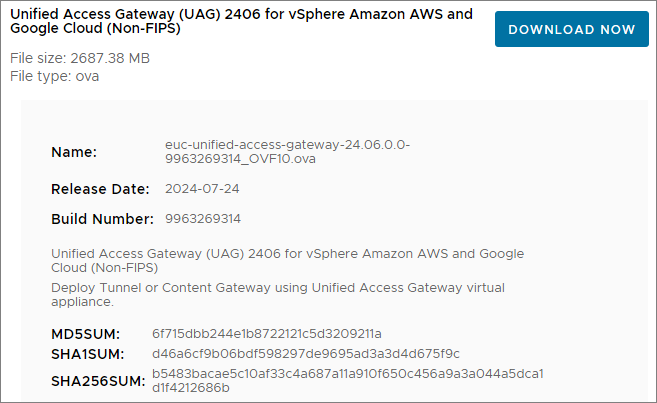
First, I download the necessary installation media and Powershell scripts from Omnissa Customer Connect to my deployment server.

Next, I login to the Admin-GUI and export the settings before I start upgrading.


I copy the new OVA-file and the updated uagdeploy Powershell files to my working directory

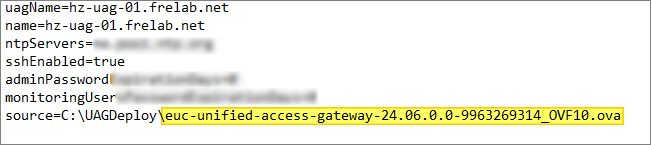
Next, I edit the ini-files with new ova filename
In my previous upgrades, I have reconfigured the SSL Certificates after deployment. This time, I will use the ini-file to configure the SSL Certificate. I first export the certificates from the HAProxy server as described here: HAProxy Export certificates. Next, I need to encrypt my key with RSA, running the command documented by VMware here: Convert Certificate Files to One-Line PEM Format.
openssl rsa -in c:\cert\desktop\privkey.pem -check -out c:\cert\desktop\privkey_rsa.pem
I copy the “privkey_rsa.pem”-file to my working folder and adjust the SSLCert section in the ini-file

Finally, I deploy the UAG’s with the new ova-file using the existing ini-files. As we can see from the screenshot below, the script automatically shuts down the existing UAG’s and deletes them, before deploying the new UAG’s using the settings I defined in the ini-files. NOTE: When executing the uagdeploy.ps1 script, I previously used PASSWORD PASSWORD false false no as parameters, but these no longer works. I replaced PASSWORD with the passwords I wanted to use instead, which works flawlessly. For details see: Using PowerShell to Deploy the Unified Access Gateway Appliance

It is also important to check out the new demands due to the “Re-Write Origin Header” property, as documented by Omnissa here: Configure Horizon Settings

Reference: Cross-Origin Resource Sharing (CORS) with Horizon 8 and loadbalanced HTML5 access. (85801)
I adjust my locked.properties file as shown below and restart my Connection Servers

When the upgrade is complete, I log in and check that all my settings are correct,

I also login to Horizon Administrator, where I can see that the Gateways are up and running the new version

This completes the UAG upgrade, and I do a test by logging in through the HAProxy and UAG’s. With this done, I can now proceed with upgrading the MDT OSOT components prior to upgrading agents within the Horizon Desktops, covered here: Horizon – Upgrade OSOT MDT Plugin to v. 1.2.2406
Omnissa Documentation:
- Unified Access Gateway Release Notes
- Configure Horizon Settings
- Cross-Origin Resource Sharing (CORS) with Horizon 8 and loadbalanced HTML5 access. (85801)
- Horizon 8 2406 Release Notes
- Horizon 8 Upgrade Overview
- Product Interoperability Matrix
- Horizon 8 Docs
VMware Documentation:
- Using PowerShell to Deploy the Unified Access Gateway Appliance
- Convert Certificate Files to One-Line PEM Format.
Unified Access Gateway – Upgrades
Unified Access Gateway planning, deployment etc.
Disclaimer: Every tips/tricks/posting I have published here, is tried and tested in different it-solutions. It is not guaranteed to work everywhere, but is meant as a tip for other users out there. Remember, Google is your friend and don’t be afraid to steal with pride! Feel free to comment below as needed.
 bjosoren's IT-Tech blog