
Release date: November 10th 2025
Welcome to my Omnissa Unified Access Gateway series. The new version of Unified Access Gateway, 2506, was GA July 31st 2025. In this section I will describe how I upgraded my UAG’s to v. 2506. According to Omnissa’s official documentation, this should be done as step 8 in the supported update sequence.

To check out all the new features and changes with Unified Access Gateway 2506, read the release notes from Omnissa posted here: Unified Access Gateway Release Notes. Below are some of the most important changes.
What’s New
- Important Security Update for Horizon Deployments
- Support for Device X.509 certificate and SAML authentication
- Added support for Device X.509 certificate authentication (enabling mutual TLS authentication with Horizon Client) followed by SAML authentication. The feature is currently supported only on Horizon Client for Mac. For more information, see Configure Horizon Settings on Unified Access Gateway for SAML Integration and Omnissa Horizon Client for Mac Release Notes.
- Support all source locators of VMware OVF tool
- Unified Access Gateway PowerShell scripts now support the same source locators as the VMware OVF tool for vSphere deployments.
- Enhancements to Origin HTTP Header feature
- The constraints mentioned in the Additional Notes section on the previous Unified Access Gateway (2503) release are now obsolete.
- Chrome native client users do not have to add the extension.
- If Origin Check Required setting is set to false, the Re-Write Origin setting is also set to false.
- By default, the common blast and tunnel external URLs are added to the auto-allowed list. There is no need to add a URL without the port explicitly.
- Support for deploying Unified Access Gateway with Horizon 8 on Nutanix AHV – Limited Availability
- Support for deploying Unified Access Gateway with Horizon 8 on Hyper-V
First, I download the necessary installation media and Powershell scripts from Omnissa Customer Connect to my deployment server.


Next, I login to the Admin-GUI and export the settings before I start upgrading.


I copy the new OVA-file and the updated uagdeploy Powershell files to my working directory

Next, I edit the ini-files with new ova filename
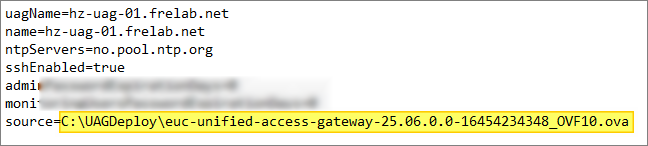
In my previous upgrades, I have reconfigured the SSL Certificates after deployment. This time, I will use the ini-file to configure the SSL Certificate. I first export the certificates from the HAProxy server as described here: HAProxy Export certificates. Next, I need to encrypt my key with RSA, running the command documented by Omnissa here: Convert Certificate Files to One-Line PEM Format.
openssl rsa -in c:certdesktopprivkey.pem -check -out c:certdesktopprivkey_rsa.pem
I copy the “privkey_rsa.pem”-file to my working folder and adjust the SSLCert section in the ini-file

Finally, I deploy the UAG’s with the new ova-file using the existing ini-files. As we can see from the screenshot below, the script automatically shuts down the existing UAG’s and deletes them, before deploying the new UAG’s using the settings I defined in the ini-files. NOTE: When executing the uagdeploy.ps1 script, I previously used PASSWORD PASSWORD false false no as parameters, but these no longer works. I replaced PASSWORD with the passwords I wanted to use instead, which works flawlessly. For details see: Using PowerShell to Deploy Omnissa Unified Access Gateway

It is also important to check out the new demands due to the “Re-Write Origin Header” property, as documented by Omnissa here: Configure Horizon Settings

Reference: Cross-Origin Resource Sharing (CORS) with Horizon 8 and loadbalanced HTML5 access. (85801)
I adjust my locked.properties file as shown below and restart my Connection Servers

When the upgrade is complete, I log in and check that all my settings are correct,


I also login to Horizon Administrator, where I can see that the Gateways are up and running the new version

This completes the UAG upgrade, and I do a test by logging in through the HAProxy and UAG’s.
Unified Access Gateway Release Notes
UAG Documentation:
- Configure Horizon Settings
- Cross-Origin Resource Sharing (CORS) with Horizon 8 and loadbalanced HTML5 access. (85801)
- Using PowerShell to Deploy Omnissa Unified Access Gateway
- Convert Certificate Files to One-Line PEM Format.
Omnissa Documentation:
- Rebranding Changes in Omnissa Horizon Products (6000681)
- Horizon 8 Upgrade Overview
- Product Interoperability Matrix
- Omnissa Product Documentation
Unified Access Gateway – Upgrades
Unified Access Gateway planning, deployment etc.
Disclaimer: Every tips/tricks/posting I have published here, is tried and tested in different it-solutions. It is not guaranteed to work everywhere, but is meant as a tip for other users out there. Remember, Google is your friend and don’t be afraid to steal with pride! Feel free to comment below as needed.
 bjosoren's IT-Tech blog