
Release date: November 8th 2023
Welcome to my VMware Horizon series. In this session I will describe how I upgraded the VMware Horizon Agent in my template to v. 2309. According to the VMware Horizon 8 2309 Release Notes, these are the changes to the Horizon Windows Agent:
- Horizon Agent for Windows
- Media Optimization for Microsoft Teams offers give and take control of individual application sharing in VDI and RDSH desktop sessions for VMware Blast display protocol (Windows clients). Overlapping applications obscuring the content of the shared application appear greyed out over the shared application.
- If you plan to upgrade the Windows 10 or Window 11 Guest OS while leaving Horizon Agent in place, see KB 2148176 for guidance.
- For the Storage Drive Redirection feature, you can control read/write permissions of the shared drive on the agent side by setting the string value of the Windows registry key HKEY_LOCAL_MACHINE\SOFTWARE\VMware, Inc.\VMware VDM\SDR\ReadOnly.
- For the Location Based Printing feature, you can locate a specific printer by label.
- Universal Printer Driver (EMF) in VMware Integrated Printing supports specific font types.
- The UNC Path Redirection feature for Microsoft Office now supports redirection of network links from Word, Excel, and PowerPoint applications.
- Horizon Agent has new mouse cursor processing optimizations which can increase the number of Horizon sessions that can run on a single virtualization host.
- You can configure URI redirection to open specific local applications between Windows agents and clients by setting an absolute path for the local application and creating URI parameters to redirect the application in the GPO setting Url Redirection App Path Rule.
- VMware Horizon Blast Extreme protocol now supports Indirect Display Driver Class Extension version 1.6 and newer. This results in better virtual machine consolidation ratio and improved performance with lower CPU utilization on the Windows operating systems.
- If you have VMware Horizon Cloud Service – next-gen installed in your environment, you can monitor Horizon Agent on Windows desktops by enabling the Horizon Agent Monitoring Service (hzMonService).
According to VMware’s official documentation, this agent-upgrade should be done as step 11 in the supported update sequence.

I start out by downloading the installation media from VMware Customer Connect
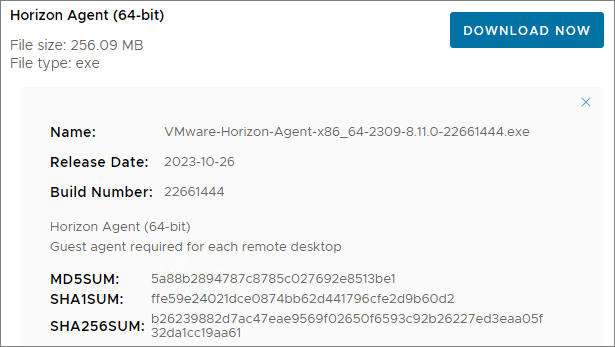
As I’ve gone over to using MDT to create Horizon templates, described here: Automating Template Creation & Maintenance, I will update the Horizon Agent in the Deployment Share, and run through the task sequence to create a new template. Before I begin, I open the task sequence and can see that it has found the 2306 Agent in the Deployment Share.

I close the Deployment Workbench MMC before I continue. To update the Horizon Agent in the Deployment Share I will first delete the existing agent and msi-folder from the Deployment Share

Next, I copy the new VMware Horizon Agent executable to the “HorizonAgent” folder in the Deployment Share. It is important to make sure that the executable isn’t blocked by Windows Security, therefore I right-click the exe-file, select Properties and tick the Unblock box, if it exists. This also applies to the other executable files under the “D:\DeploymentShare\VMware” folder.


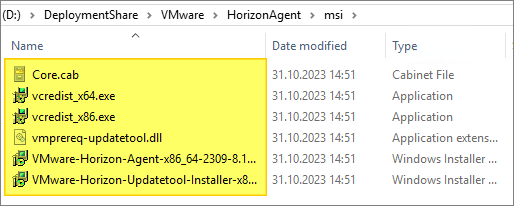
When I now open the Deployment Workbench MMC, the new Horizon Agent will be identified and the msi-files will be automatically extracted.


As my task sequence is based on the osot.xml template, I will also have to edit this file
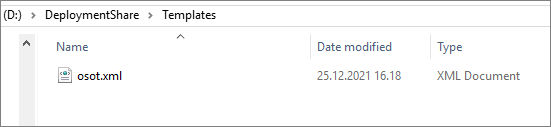
I locate the “Horizon Agent” step and adjust the name of the “ExeInstaller” to match the executable I copied in earlier

Once done, I open Deployment Workbench MMC and verify that the correct Horizon Agent is found, and update the deployment Share, before I run through the task sequence and push the new template to my desktop pool.
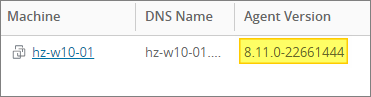
Having finished the Windows Agent upgrade, I can now proceed with upgrading the agent in my Linux template, covered here: VMware Horizon – Upgrade Horizon Linux Agent to v. 2309
VMware Documentation:
VMware Horizon 8 2309 Release Notes
VMware Horizon planning, deployment etc.
Official VMware Horizon 8 Documentation
Disclaimer: Every tips/tricks/posting I have published here, is tried and tested in different it-solutions. It is not guaranteed to work everywhere, but is meant as a tip for other users out there. Remember, Google is your friend and don’t be afraid to steal with pride! Feel free to comment below as needed.
 bjosoren's IT-Tech blog