
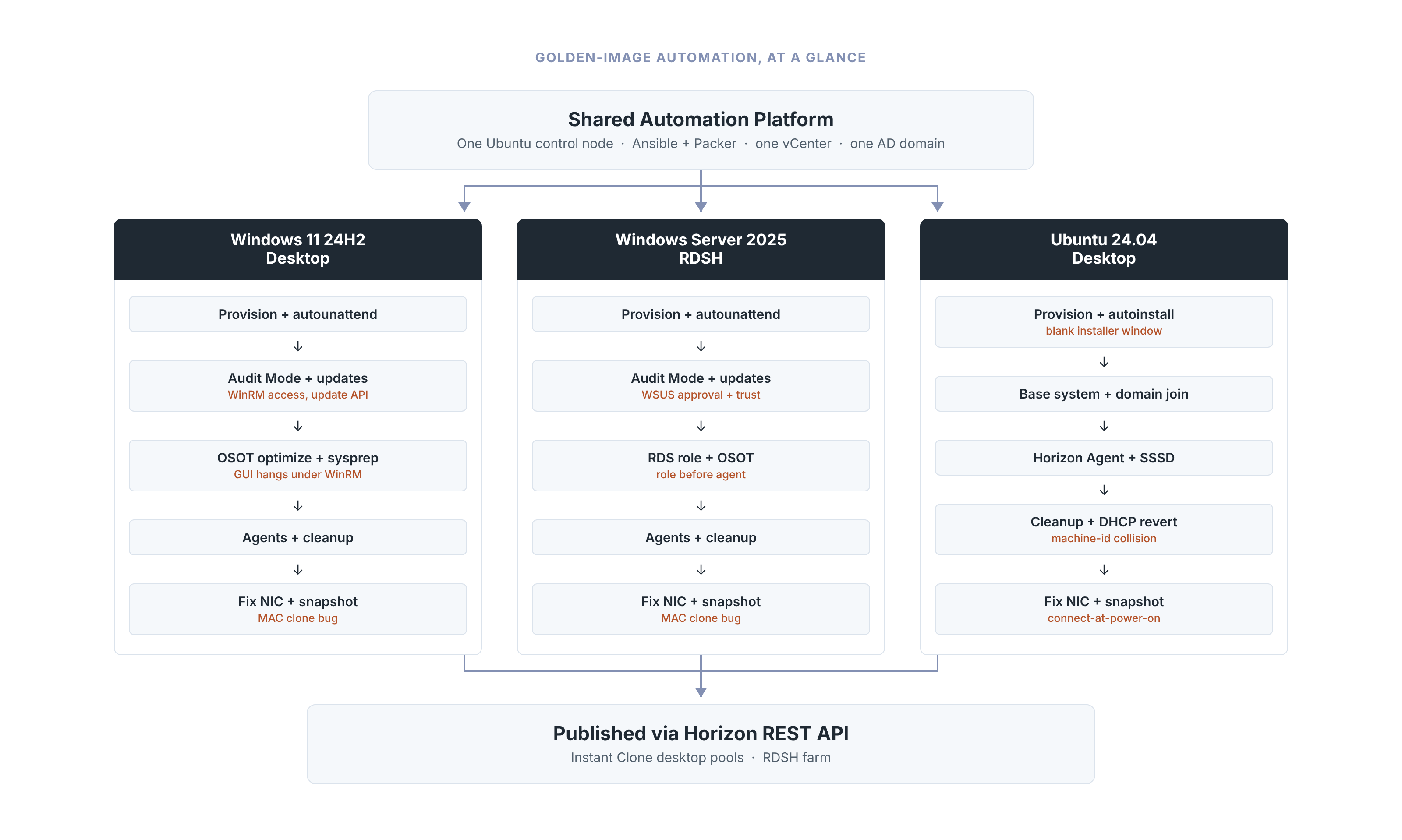
Over the past couple of months I’ve turned the golden-image workflow for Omnissa Horizon into something that actually runs itself. What started as a handful of manual walkthroughs is now a proper Packer + Ansible pipeline: one shared automation platform, one control node, and three OS-specific builds — Windows 11 24H2, Windows Server 2025 RDSH, and Ubuntu 24.04 — all driven from the same scripts/build.sh. This post is the wrap-up: what the platform actually looks like end to end, the real bugs that shaped it, and a quick look at what’s coming next.
The platform underneath it all
Everything runs off one Ubuntu control node with Ansible and Packer, against one vCenter and one AD domain — the full rundown is in Setting Up an Ansible/Packer Image-Automation Platform. Most of the early pain here wasn’t glamorous: a system-wide ansible-core install from apt quietly shadowing the venv that Ansible actually needs to run from, a vault rekey gone sideways that nearly locked me out of every secret at once, Kerberos failing for no reason other than clock skew. None of it is exciting, but it’s exactly the kind of thing that eats a whole afternoon if you don’t know to go looking for it.
Windows 11 24H2 Desktop
The Windows 11 24H2 build runs Audit Mode from the inside: a floppy-injected autounattend file drops the VM into Audit Mode, WinRM comes up over NTLM so Ansible can drive the rest, and then it’s Windows Updates, OSOT, and Sysprep — all unattended. The two bugs that cost the most time: an answer file that only wrote the Secure Boot workaround when Secure Boot happened to already be off, which made Windows Setup stop cold with 0x8007000D – 0x40030; and OSOT’s own optimization GUI hanging under WinRM, because it needs an interactive desktop that a remote session simply doesn’t have. Sysprep had its own surprises too — it quietly reverts half of what the first optimization pass did, so OSOT Optimize ends up running twice, and it fails outright with SYSPREP_APPX if even one Store app survived onto the build user’s profile.
Windows Server 2025 RDSH
The RDSH build leans on almost the same pipeline as Windows 11 — same Audit Mode dance, same WinRM-over-NTLM headaches, same two-pass OSOT Optimize. What’s different is the RDS-RD-Server role: it has to install before the Horizon Agent, or Horizon never detects the machine as RDSH at all. And because this image leans on WSUS rather than talking to Windows Update directly, an unapproved update or an untrusted WSUS certificate doesn’t fail where you’d expect — it shows up two steps later as a flat DISM failure that has nothing obviously to do with WSUS.
Ubuntu 24.04 Desktop
The Ubuntu 24.04 build is the odd one out, and the one with the most interesting bugs. Ubuntu’s autoinstall genuinely builds the OS unattended, but the graphical installer would sometimes sit on a blank white window on the vCenter console and never move. It turns out vsphere-iso’s boot_command has no VNC session behind it at all — just vCenter’s own keyboard HID API — so on this builder there was never anything driving a pointer to begin with. A handful of Tab keypresses at the right moments wakes the installer up (a WebMKS-based real mouse click is the documented fallback if that ever stops working). The other real one: two completely different VDIs, from two different pools, with genuinely different MAC addresses — landing on the exact same DHCP-leased IP. Every clone of the image shares the same /etc/machine-id, and that’s what systemd-networkd was actually using to identify itself to DHCP, not the MAC address. Pinning dhcp-identifier: mac in netplan fixed it outright.
The pattern underneath the pains
Looking back across all three builds, the pains fall into two buckets. One is Windows-flavored: getting WinRM and the Windows Update API to cooperate unattended, and working around a GUI tool (OSOT) that was never designed to run headless — that bucket hit Windows 11 and RDSH almost identically. The other is an identity-after-cloning bucket that hit all three builds in different clothes: a NIC’s MAC address type getting cloned verbatim from the build VM, a recreated adapter left disconnected until someone powered it on by hand, Ubuntu’s DHCP client identifier colliding across clones. None of those show up during the build itself — they only show up after the image is published and something tries to use it, which is exactly what makes them the expensive ones to chase down.
What’s next: a web GUI
None of this is meant to stay something only I can run from a terminal. The next piece in progress is a small self-service web GUI in front of all three pipelines — pick an OS, hit build, watch it go — without anyone needing SSH access to the control node or a mental model of scripts/build.sh’s interactive prompts. Still early days, but that’s the direction this is heading. More on that once there’s something worth screenshotting.
Disclaimer: Every tips/tricks/posting I have published here, is tried and tested in different IT-solutions. It is not guaranteed to work everywhere, but is meant as a tip for other users out there. Remember, Google is your friend and don’t be afraid to steal with pride! Feel free to comment below as needed.
Enjoy…